Adding a library to drive the 7-segment module
Arduino allows you to import and use pre-coded modules in your sketches. What we are going to do now is import a library that contains all the code to flash numbers on the module. If means you don’t have to write code to turn on and off the individual segments of the display module. We will need to change the pin connections.
You will need the seven segment zip file
- In the Arduino screen, open and save a new file. Call it “SevenSegmentDisplaySingleNumbers”
- Click on the ‘Sketch’ tab then ‘include library’ then ‘add .zip library…’

- Select the ‘sevseg.zip’ folder that you have downloaded from the link above. Arduino will add it to the list of available libraries for you
- When you return to the Arduino screen click on Sketch > Include Library > sevseg
- You should now see an include instruction at the top of your sketch that looks like this:
- You now have all the functions that drive the module available to use. This will help simplify your coding
-
We need to connect the module’s pins to the Duinotech Mega Board in the required order. (This configuration was determined by the authors of the library we are using – Arduino is open source and has many contributors). Use the following table as your guide:
| Arduino Pin | 7 Segment Pin |
| 2 | C (4) |
| 3 | D (2) |
| 4 | E (1) |
| 5 | B (6) |
| 6 | A (7) |
| 7 | F (9) |
| 8 | G (10) |
| 9 | DP (5) |
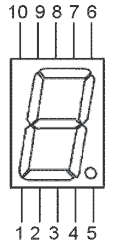
(Remember that you read left to right. Pin 1 on the module is on the left hand side of the face that is printed with the part number)
- Below is an example of what it might look like:
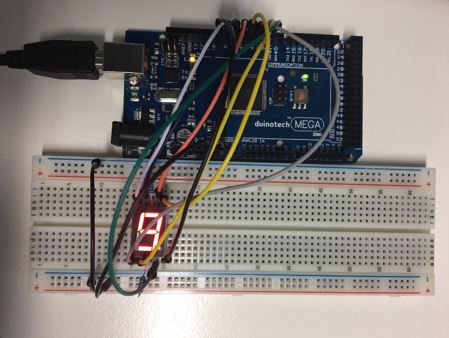
- Copy and paste the code below into the Arduino IDE and then verify and upload to your board.
________________________________________________________________________________________________________________________________
//  This code uses the seven segment single number library to display one static number.
//  The number that will be displayed is the argument in the brackets of setNumber
//  eg.  sevseg.setNumber(3);  would result in the number 3 being displayed
//  on the module.

#include <SevSeg.h>

SevSeg sevseg;

void setup() {
  // put your setup code here, to run once:
 byte numDigits = 1;
 byte digitPins[] = {};
 byte segmentPins[] = {6, 5, 2, 3, 4, 7, 8, 9};
 bool resistorsOnSegments = true;

 byte hardwareConfig = COMMON_CATHODE;
 sevseg.begin(hardwareConfig, numDigits, digitPins, segmentPins, resistorsOnSegments);
 sevseg.setBrightness(90);
}

void loop()

{

        sevseg.setNumber(9);
        sevseg.refreshDisplay();


}
_____________________________________________________________________________________________________________________________
Your board should now flash the number 9.
Can you change the code to flash a different number?